There is a distinct, quiet sadness when a once-vibrant online community begins to fade. You log in to your favorite gaming forum, niche hobby board, or specialized subreddit, only to find that the homepage has not changed in days. In the fast-paced ecosystem of the modern internet, communities do not always last forever. Platforms age, user behaviors shift, and management can deteriorate.
However, when an online community goes quiet, the active members rarely stop talking or abandon their shared passions. Instead, they pack up their digital belongings and migrate to new spaces. This survival process is known as “community migration.” If you find yourself stranded on a quiet, inactive board, this comprehensive guide will help you recognize the signs of decay, choose the right new platform, and migrate your social circle without losing years of valuable compiled knowledge.
Identifying the Warning Signs of Community Decay
Many loyal community members waste months waiting for a quiet forum to magically revive. However, once the social momentum of an online space breaks, a complete collapse is almost inevitable. Recognizing the warning signs early allows you to migrate alongside the core user base before the connection is permanently severed.
The most obvious indicator of decay is a sharp drop in posting velocity. If the “general discussion” board goes 24 hours without a single new thread, or if the average time-to-reply stretches from minutes to days, the community’s pulse is fading.
Another clear warning sign is the complete absence of moderation. If advertisement bots or spam accounts post on the main boards and their threads remain active for over 48 hours, it means the moderators have abandoned the ship. Additionally, when pinned announcements remain unchanged for years and the first page of active threads displays posts from weeks ago, the daily active user count has dropped below the critical threshold. Once the core “content creators” leave, the community’s gravity is lost.
Forum vs. Chat App: Choosing Your New Digital Home
When a community decides to migrate, one of the most critical decisions is choosing the structural style of the new platform. Generally, communities face a choice between structured bulletin boards (like Reddit or Discourse) and real-time chat servers (like Discord or Telegram).
To help you choose the best bến đỗ (destination) for your group, here is a direct comparison of the two main ecosystem styles:
| Feature Criteria | Traditional Forums (Reddit, Discourse, Web Boards) | Real-Time Chat Servers (Discord, Telegram, Signal) |
| Searchability & SEO | Excellent. Threads are easily indexed by Google and searchable years later. | Poor. Conversations are buried in deep chat logs; search functions are limited to internal members. |
| Conversation Speed | Slow & Thoughtful. Users write longer posts and reply over hours or days. | Fast & Instant. Mimics real-life conversations; replies are instant and casual. |
| Privacy & Anonymity | High. Users can maintain complete pseudonymity without linking personal data. | Medium. Often requires phone numbers or verified accounts to join servers. |
| Archive Stability | High. Ideal for hosting evergreen wikis, mega-threads, and detailed guides. | Low. Valuable information is quickly pushed out of sight by active daily chatter. |
The Migration Playbook: How to Move Your Circle Safely
Once the destination is chosen, executing the migration requires careful coordination. If done incorrectly, the community can easily fragment, leaving half the user base behind.
Backing Up Critical Threads and Wikis
Over years of activity, a community accumulates massive amounts of specialized knowledge – technical troubleshooting, hobby guides, and translations – that exist nowhere else on the internet. Before the old platform goes offline or the domain expires, saving this data is paramount.
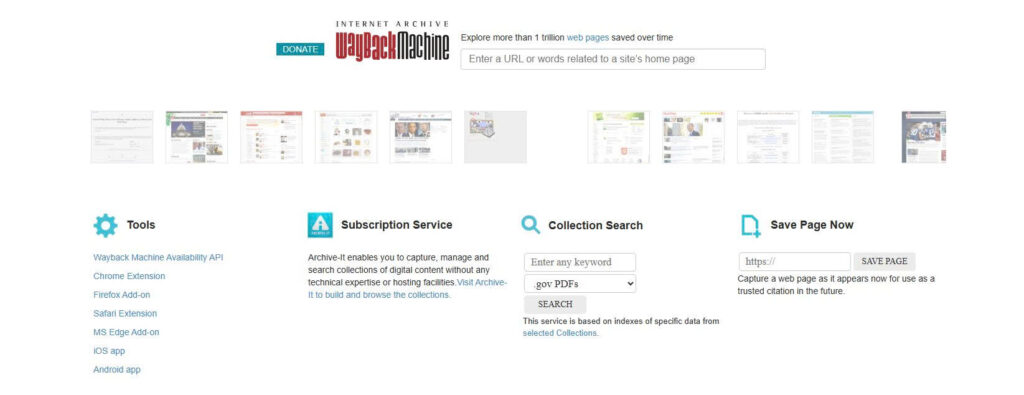
Do not rely on simple bookmarks. Instead, use browser extensions like SingleFile to export critical threads as self-contained, offline HTML files. Alternatively, you can submit the URLs of highly valuable guides to the Wayback Machine to ensure they are archived publicly forever.
Re-Establishing Contact with Core Members
Moving a community requires keeping in touch with the people who make it active. Reach out to the members you interact with most and share alternative contact details, such as Discord handles or Telegram IDs. When doing this, avoid mass-mailing or spamming public threads, as this can trigger automated spam filters on the old platform, getting your account banned before you can finish the move.
Leaving Breadcrumbs (The “Lighthouse” Post)
To prevent leaving lingering members stranded, coordinate a “lighthouse” post. This is a final, highly visible thread pinned to the top of the old forum explaining where the active user base is migrating. Keep the announcement simple, polite, and direct, providing a clear invite link (such as a Discord invite or a link to the new subreddit) so that returning users can easily find their way to the new home.
Frequently Asked Questions About Community Migration
Q: Is it safe to share my personal messaging ID when migrating to a chat-based platform?
A: Yes, if you manage your privacy settings correctly. On platforms like Discord or Telegram, you can set a unique public username (handle) and hide your phone number or email address from public view. Always audit your privacy settings before joining a new, large-scale public chat server.
What should we do if the old administrator refuses to export community data?
A: If the owner of the old forum is inactive or uncooperative, you cannot access the official SQL database. In this case, you must rely on legal, non-destructive web scraping tools (like HTTrack) to download a static mirror of the public threads, preserving the knowledge base before the hosting subscription expires.
Q: How do we prevent the new community from dying out after a few months?
A: The biggest threat to a new community is “migration fatigue.” To keep the momentum going, ensure that the new platform has clear, active moderation, and immediately establish weekly events or discussion prompts. Combining a structured archive (like a small subreddit) with a real-time chat (like Discord) provides the perfect balance of daily engagement and long-term stability.